 Netwrix Auditor
  Netwrix Access Analyzer
  Netwrix 1Secure DSPM
  Netwrix Directory Manager
  Netwrix Privilege Secure
  Netwrix Endpoint Protector


Native Auditing
Netwrix Auditor for Windows File Servers
Steps
Setting up file system auditing
- Navigate to the file share, right-click it and select "Properties" → Select the "Security" tab → Click the "Advanced" button → Go to the "Auditing" tab → Click the "Add" button → Select the following:
- Principal: "Everyone"
- Type: "All"
- Applies to: "This folder, subfolders and files"
- Advanced Permissions: "Delete subfolders and files" and "Delete"
- Run the Group Policy editor (gpedit.msc) and create and edit a new GPO. Specifically, go to → Computer Configuration → Policies → Windows Settings → Security Settings → Local Policies → Audit Policy, and setup as following:
- Audit object access → Define → Success and Failures.
- Go to "Advanced Audit Policy Configuration" → Audit Policies → Object Access, and setup as following:
- Audit File System → Define → Success and Failures
- Audit Handle Manipulation → Define → Success and Failures
- Link the new GPO to your file server.
- Apply your change by forcing a Group Policy update: Go to "Group Policy Management" → Right-click the OU → Click "Group Policy Update".
Reviewing events
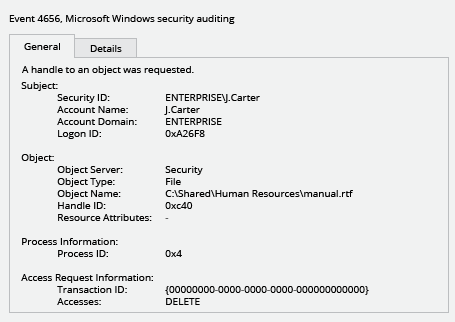
- Open the Event Viewer and search the security log for event ID 4656 with a task category of "File System" or "Removable Storage" and the string "Accesses: DELETE".
- Review the report. The "Subject: Security ID" field will show who deleted each file.
- Run Netwrix Auditor. Navigate to “Reports” → Click “File Servers” → Select “File Servers Activity” → Click “Files and Folders Deleted” → Click “View”.
- Type the server name in the “Where” field. You also can specify the path to a particular folder, using % as a wildcard character.
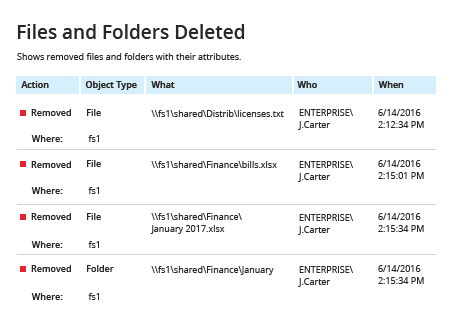
- Review the report: